
Manage, monitor and secure all your WordPress sites from one dashboard.
WardenWP centralizes uptime, security and performance monitoring, automates backups and updates, and uses AI Site Doctor to explain issues and apply safe, backup-first fixes you approve.
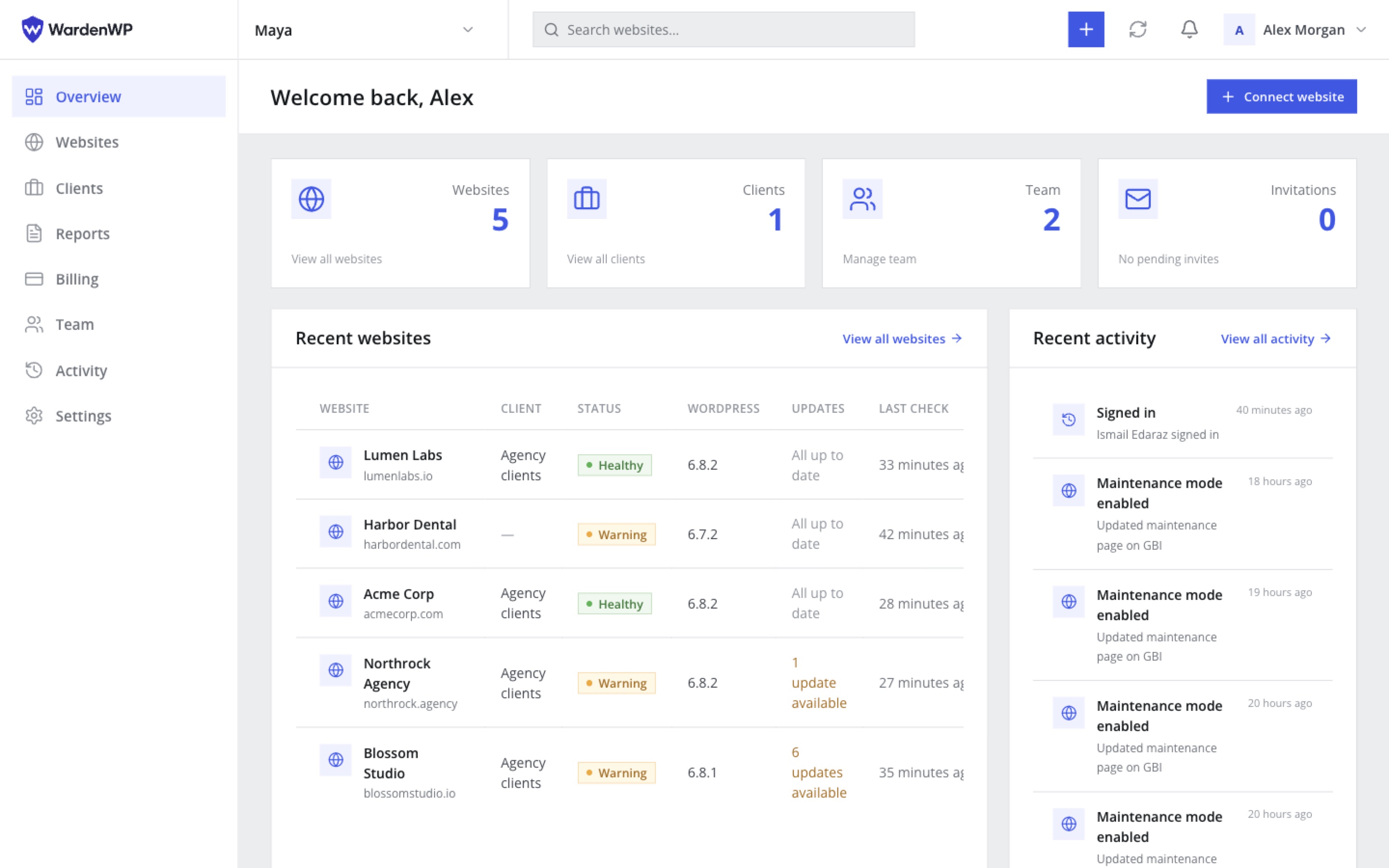
Everything a maintenance workflow needs, minus the busywork.
Connect a site once, and WardenWP keeps watching, reporting and - when you let it - fixing.
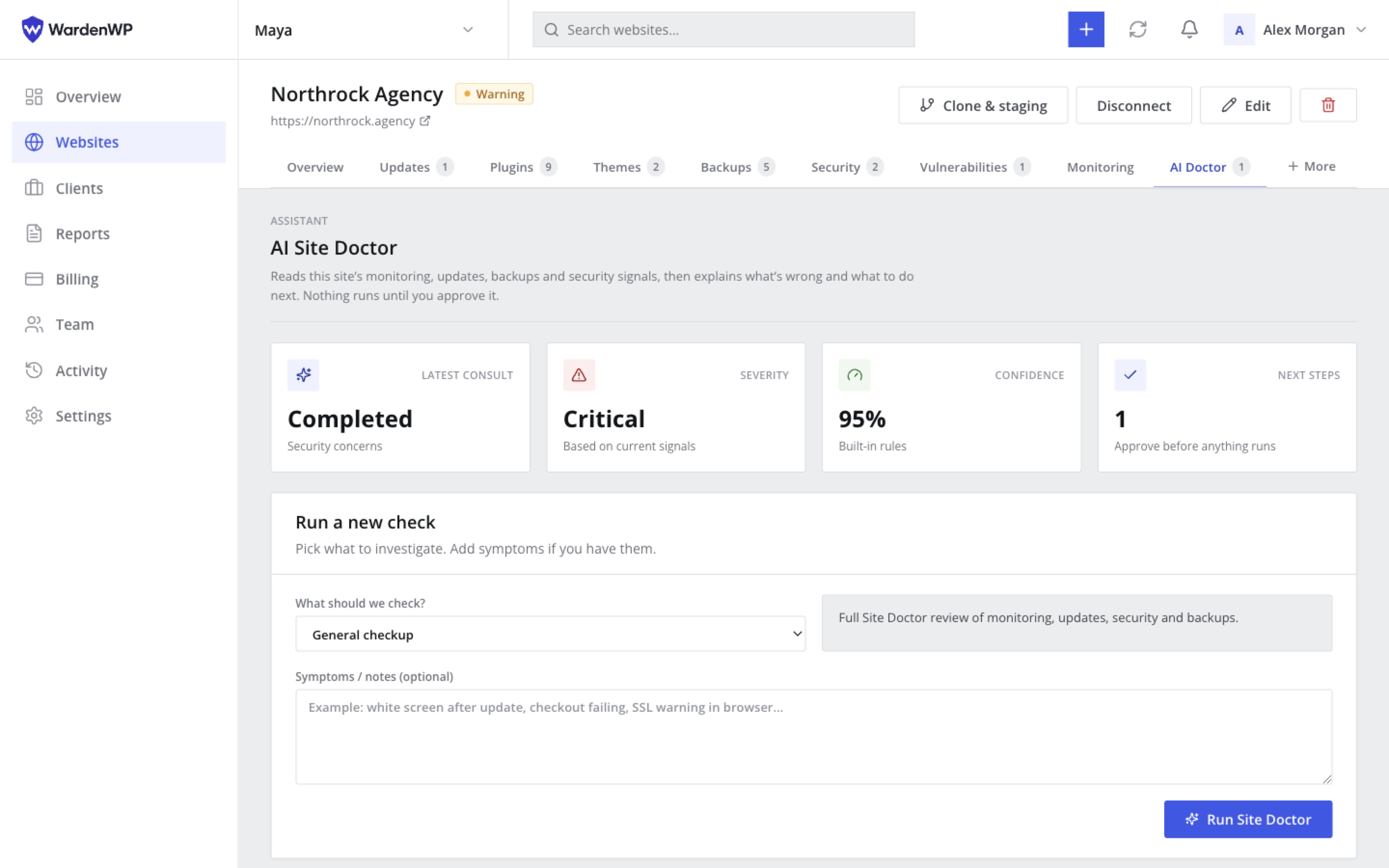
AI Site Doctor
Point it at any site - online or down - and get a plain-English diagnosis of updates, security, SSL, configuration and performance issues, with a recommended fix.
Learn moreSafe remediation
Every risky action - plugin, theme or core updates, rollbacks - automatically triggers a backup first. Nothing runs unattended without a way back.
Learn moreOne dashboard, every client
Uptime, SSL, backups, updates, security and performance for your whole portfolio - organized by client, with roles and permissions for your whole team.
Learn moreEverything you need to run WordPress care at scale
One dashboard for your whole portfolio - status, updates, backups and AI-guided fixes without hopping between wp-admin logins.
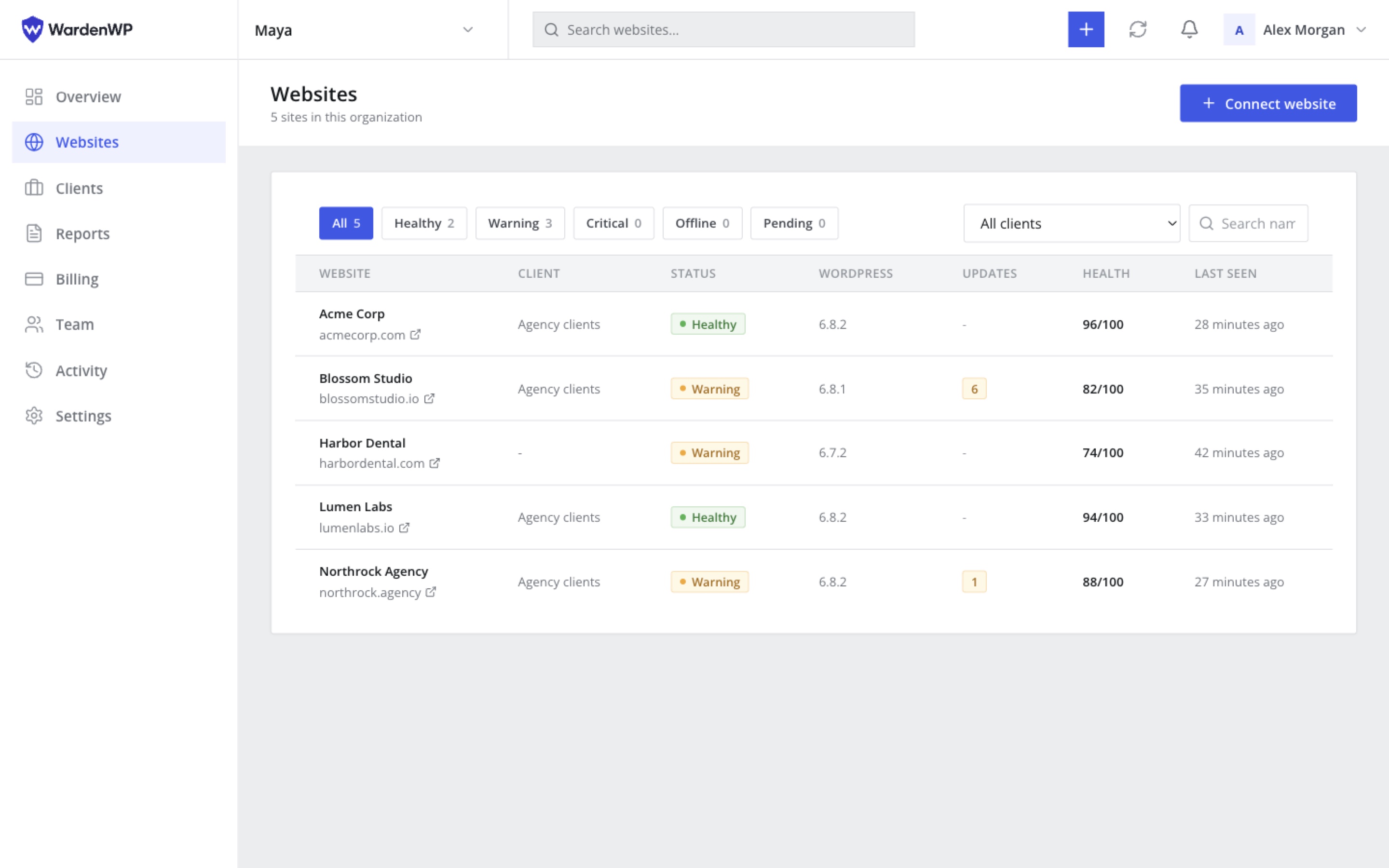
See every client site at a glance
Track uptime, pending updates and client ownership from a single websites list. Filter what needs attention and jump straight into the site that needs work.
- Status and last-seen for every connected site
- Client labels so your team knows who owns what
- Connect a new site in minutes with the signed agent
Everything you need to run WordPress care.
Eight core workflows agencies and freelancers use every day - more on the features page.
Uptime & SSL monitoring
Continuous checks with instant alerts when a site or certificate needs attention.
Learn moreAutomated backups
Scheduled, encrypted, restorable in a couple of clicks - with storage you control.
Learn moreSecurity check
A 0-100 score, findings and hardening checks - file editor, XML-RPC, debug mode and more.
Learn moreVulnerability protection
Detect known CVEs across plugins and themes, prioritize updates, and keep agent protection on.
Learn moreCore, plugin & theme updates
Review and apply updates one site or many at a time, with activate/deactivate controls.
Learn morePerformance check
Response time, page weight, caching and compression, scored with clear recommendations.
Learn moreBranded client reports
Scheduled, emailed, exportable PDF reports your clients actually understand.
Learn moreWhite label
Your logo, colors and sender address on reports, email and the connected WordPress plugin.
Learn moreAsk AI Site Doctor. Get a diagnosis, not just an alert.
Instead of a wall of raw data, AI Site Doctor reads your monitoring, security, update and performance signals and explains - in plain English - what's actually wrong and what to do about it.
Four steps from connect to fix.
You approve every change.
Install the agent, watch your portfolio, let AI Site Doctor explain issues, then approve backup-first actions - without logging into each wp-admin.
-
Connect
Add a site in minutes
Install the lightweight agent plugin and pair it with your dashboard. WordPress passwords stay on the site - never stored in WardenWP.
-
Monitor
See what needs attention
Uptime, SSL, security, performance and updates across every client site - one list, clear status, no tab hopping.
-
Diagnose
Get a plain-language plan
When something looks off, AI Site Doctor reads your signals and explains the risk - with a sequenced fix plan you can review.
-
Act
Approve. Apply. Audit.
Nothing changes a client site until you confirm. Sensitive actions take a backup first and land in your audit log.
Your sites. Your data.
Protected by design.
Trust starts with how your data is handled. From separate workspaces to signed commands, safeguards are built into the way WardenWP works.
Explore security checksYour data stays in your workspace
Access to sites and resources is scoped to your organization on the server, keeping client workspaces separate.
Commands are verified
Commands sent to your WordPress agent use HMAC signatures, timestamps and replay protection to verify requests.
Secrets stay protected
Agent secrets, backup storage keys and API credentials are encrypted at rest to protect sensitive connections.
A record you can follow
An append-only audit log helps you review admin and agent activity, with sensitive fields automatically redacted.
Predictable pricing for your whole portfolio.
One flat price per organization - not pay-per-addon like ManageWP. Pay yearly and get 2 months free.
Starter
2 months free vs monthly
- Up to 10 websites
- Everything in Free
- Basic AI diagnostics
Pro
2 months free vs monthly
- Up to 30 websites
- Everything in Starter
- Backups & safe updates
- AI Site Doctor
- Client PDF reports
- Team members
Agency
2 months free vs monthly
- Up to 100 websites
- Everything in Agency
- Advanced AI & safe remediation
- Automation & scheduled reports
- White-label ready
Answers before you connect your first site
Security, pricing, white-label and how safe fixes work - the questions agencies ask most before switching their maintenance workflow.
Still deciding?
Start free with monitoring and manual updates on up to 3 sites, then upgrade when you need backups, AI or client reports.
Create a free accountWhat exactly is WardenWP?
WardenWP is a hosted dashboard for agencies and freelancers who manage many WordPress sites. It centralizes uptime and SSL monitoring, backups, security and performance checks, updates, team roles and branded client reports - plus AI Site Doctor to explain issues and recommend safe, backup-first fixes you approve before they run.
Do you need my WordPress admin password?
No. You connect each site with a lightweight agent plugin and a single-use install token. After that, every command between the dashboard and the site uses a signed, timestamped, replay-protected HMAC signature. Your WordPress credentials never leave the site and are never stored in WardenWP.
What happens before an AI-recommended fix runs?
Nothing changes without your approval. For actions that alter the site - updating or rolling back a plugin, theme or core, or restoring a backup - WardenWP takes a backup first. Lower-risk actions like clearing cache do not require a restore point. You stay in control of what runs and when.
Is there a Free plan I can try first?
Yes. Start on the Free plan with up to 3 websites, monitoring and manual updates. Paid plans unlock AI diagnostics, backups, client reports, team seats and higher site limits - with a fixed monthly price per organization.
Can I white-label WardenWP for my clients?
Yes. Brand client-facing reports and emails with your agency name, logo, colors, sender address and footer. You can also rebrand the connected WordPress plugin so clients see your agency - not WardenWP - inside wp-admin.
Can my team work in the same organization?
Yes. Invite teammates, assign roles and permissions, and keep client sites isolated by organization. Updates, restores, logins and other sensitive actions are recorded in a per-organization audit log so you always know who did what.
How is WardenWP different from ManageWP or MainWP?
ManageWP bills many premium tools per site, per add-on. WardenWP uses a fixed monthly cost for your portfolio instead of stacking add-ons. MainWP is self-hosted if you want to run the control plane yourself. WardenWP is a modern hosted SaaS focused on agency care plans: signed-agent connections, backup-first remediation, AI-assisted diagnostics, monitoring and white-label reporting.
Where are backups kept, and can I cancel anytime?
Backups are encrypted and retained according to your plan and schedule, with on-demand snapshots before risky changes. Backups unlock from the Agency plan. You can cancel a paid subscription at any time; your Free-plan access and export options remain available so you are not locked into a workflow you cannot leave.
Stop juggling wp-admin tabs. Run every client site from one place.
Start free with up to 3 sites. Connect in minutes - no WordPress passwords stored.